Launch a reactivation campaign
This end-to-end tutorial connects three Campaigns areas to one marketing goal: reach former or inactive members at one club with a reviewed, one-time Email offer and learn from the result.
Set the reactivation goal, audience boundary, channel, and measure
Validate the Segment, select reviewed content, and create the Broadcast
Review the fresh count, consent, message, and timing before publishing
Interpret delivery and engagement, then record the next improvement
Practice with synthetic Demo data first. In a live workspace, confirm the offer, audience, permission, links, timing, and approval owner before any publish action.
Before you begin
Prepare:
- one club and its exact club code;
- the member-status value your organization uses for the intended former or inactive audience;
- a reviewed landing page, offer, and end date;
- an Email sender and required unsubscribe content;
- the marketer responsible for results and downstream membership outcomes.
Define the outcome and measures
Write one sentence that states the audience, action, and deadline. For example:
Encourage eligible former members at one club to review a reactivation offer before its end date.
Choose a Broadcast measure such as delivered, opened, or clicked. Track an actual membership reactivation in the appropriate operating record; Broadcast results do not prove that a membership changed.
Build and validate the Segment
In Campaigns → Segments, build a saved audience with Match ALL:
- Club Code equals the intended club;
- Member Status equals the exact former or inactive value selected by the organization;
- Email Consent equals Yes.
Name it using the standard pattern, for example:
Club | Former members | Email reactivation
Check the estimate after every condition. Stop if the result is zero, unexpectedly broad, or otherwise unreasonable. Use Create your first segment for the builder workflow and the Filter guide before adding more conditions.
Do not guess which membership status represents the intended audience. Use a value your organization has reviewed, and keep the club and Email permission conditions explicit.
Prepare reusable Email content
Use Campaigns → Templates when the offer structure will be reused. Create or select an active Email Template with:
- a clear internal name and category;
- a subject that matches the offer;
- concise HTML content and one primary action;
- only supported personalization variables;
- the required unsubscribe link;
- links, dates, and variable samples that have been reviewed.
If the message is truly one-off, the Broadcast can use custom content instead. Follow Create an Email template and Personalize, preview, and test for the full review path.
Create the Broadcast draft
In Campaigns → Broadcasts, create a new Email Broadcast. Use an internal name that connects the club, audience, and purpose, then:
- choose the saved reactivation Segment;
- verify the displayed estimate;
- choose the reviewed Template or custom content;
- read the actual subject and body copied into the Broadcast;
- save a Draft before any publish decision.
The Broadcast has its own content after a Template is selected. A later edit to the library Template does not rewrite this Draft. Use Create your first broadcast for the detailed wizard steps.
Review the final content
Reopen the Draft and check:
- the offer and deadline agree everywhere;
- every link reaches the intended page;
- personalization still reads naturally with short, long, and missing values;
- the sender identity and unsubscribe content are correct;
- the selected Segment and Email channel still match the plan.
Ask a second operator to review a high-impact or broad campaign.
Choose the timing and stop at the publish gate
Choose an immediate or scheduled start based on the offer and operating plan. The publish confirmation is the final safety gate, not a routine click.
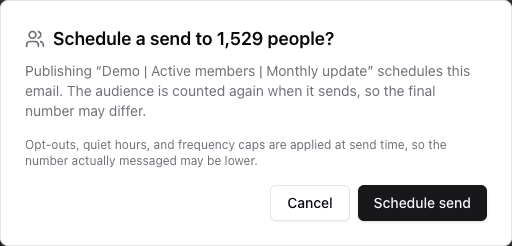
- 1Confirm the exact Broadcast and channel.
- 2Compare the fresh audience count with the reviewed expectation.
- 3Read what publishing will make eligible to send.
- 4Publish only after the full preflight is complete.
Before publishing, confirm:
- the fresh recipient count is reasonable;
- the channel is Email;
- the schedule matches the intended time zone and deadline;
- the Segment, content, consent, and approval checks are complete.
Use Publish or schedule safely for every final gate and warning.
Review delivery and engagement
After processing, open the Broadcast results. Read the funnel in order:
- Recipients — people represented in the send attempt;
- Sent — messages accepted for sending;
- Delivered — messages reported as delivered;
- Opened and Clicked — tracked Email engagement.
Review failed, skipped, and deferred outcomes separately. Do not treat a click as a completed reactivation.
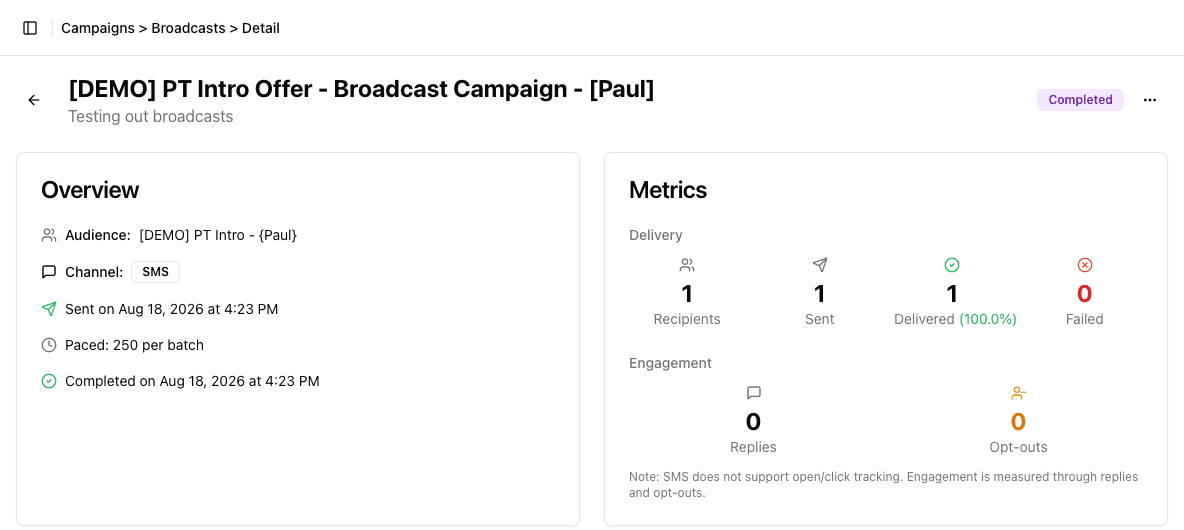
- 1Confirm the audience, channel, timing, and pacing first.
- 2Read recipients, sent, delivered, and failed in order.
- 3Interpret channel-specific engagement only after delivery.
Use Results and troubleshooting to interpret each outcome and choose a recovery path.
Close the learning loop
Record:
- the reviewed Segment and its fresh publish count;
- delivered, opened, clicked, failed, skipped, and deferred outcomes;
- the downstream reactivation result and where it was measured;
- questions or audience-quality issues;
- one change to the audience, content, offer, or timing before reuse.
Clone or reuse campaign material only after deciding what should remain the same and what the results justify changing.
Next campaign
Return to Plan and run campaigns to choose a one-time Broadcast or an ongoing Journey for the next goal.