Create an SMS template
Create an SMS template for a short message pattern that marketing staff will reuse, such as a same-day reminder, follow-up, or focused offer.
Open the SMS template sheet
In the Admin app, open Campaigns, then Templates. Select New Template, then SMS Template.
Add the internal details
Enter a clear Name. Add an optional Description that explains the use case and a consistent Category.
The type is set to SMS. Keep Active on only when the template is ready for campaign use.
Write one focused message
In Body, identify the sender and make the requested action clear. For example:
Hi {{member.firstName}}, your class at {{club.name}} starts at 6 PM. Reply to the club if you need help.
Use only the variables shown in the SMS sheet. Essential meaning should not depend on a variable.
Read the live estimate
As you type, FitStack substitutes sample values and estimates:
- character count;
- SMS segment count;
- encoding;
- cost per message.
Hover or focus the estimate for its breakdown.
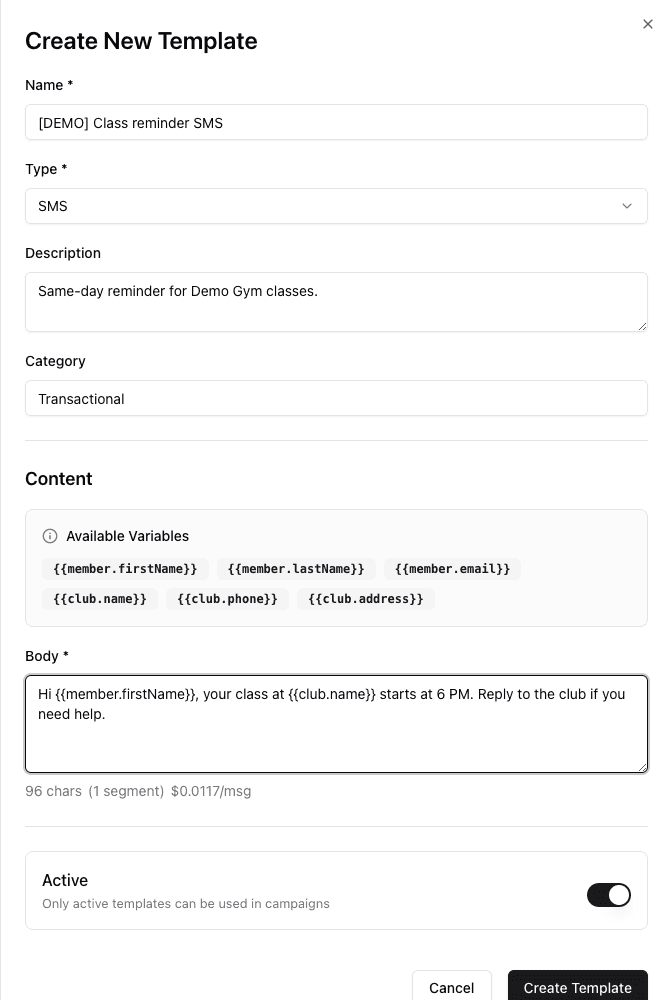
- 1Give the SMS template a clear internal name.
- 2Use only the variables offered for SMS.
- 3Keep the sender, purpose, and action clear in the body.
- 4Recheck characters, segments, and cost after every edit.
- 5Keep Active intentional before creating the template.
Opens a new SMS template, enters synthetic Demo properties and personalized content, then checks the live character, segment, encoding, and cost estimate. No template is created.
Emoji and some symbols use Unicode encoding and can reduce one segment’s capacity from 160 to 70 characters. The displayed price uses estimated US rates and can vary. Recheck the estimate after every content change.
Create the template
Select Create Template only after the message is concise, the sample substitutions fit, and the segment estimate is reasonable.
SMS review checklist
- Is the sender recognizable?
- Is there one clear purpose or action?
- Are dates and times unambiguous?
- Does the message still make sense with longer names?
- Did a symbol or emoji change the encoding?
- Is the active status intentional?
SMS templates do not have an Email-style test-send control. Review the selected template again inside a small, consented test Broadcast before a broad send.