Manage segments
The Segments list shows each segment’s name, description, saved size, status, and Count updated time.
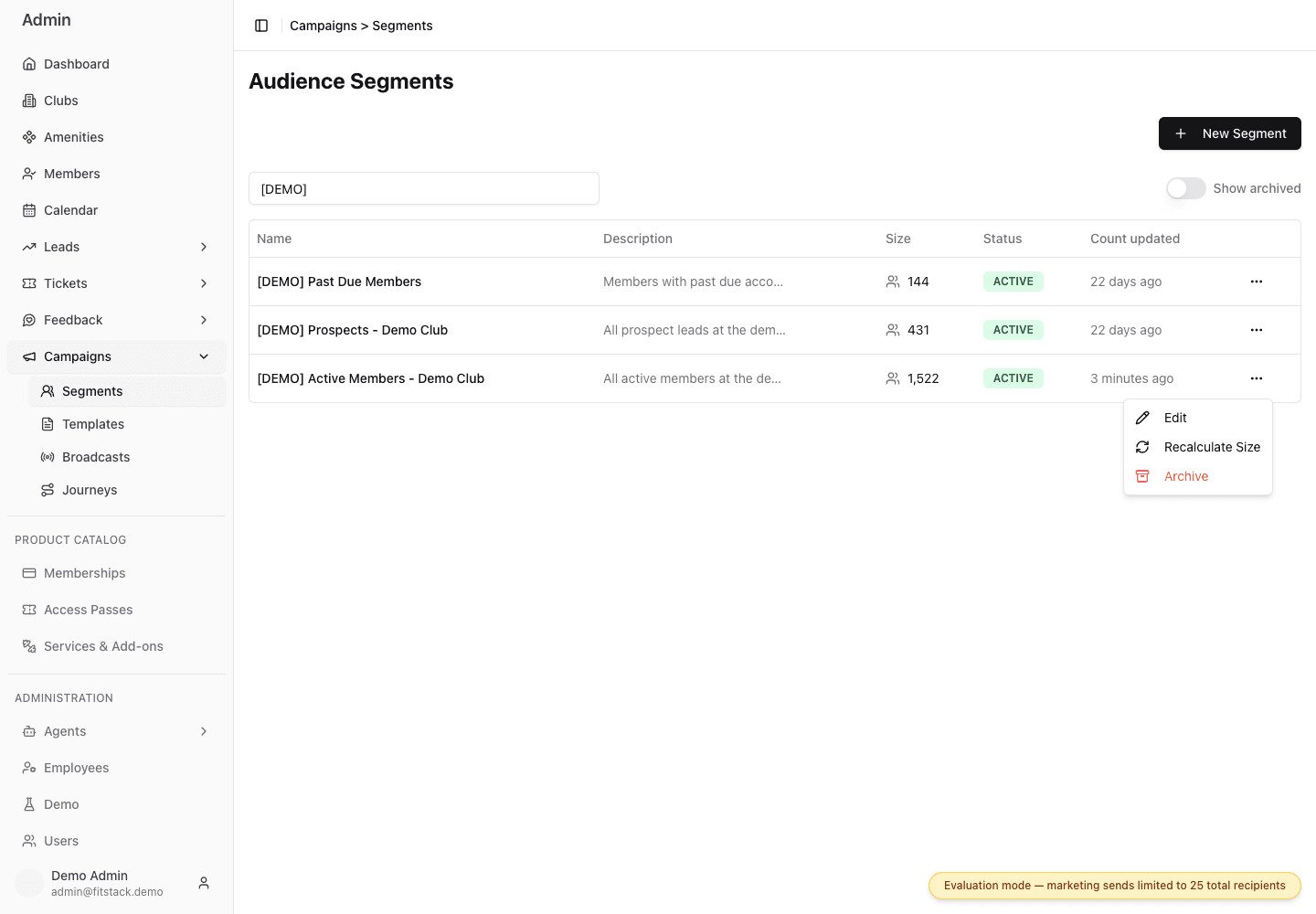
- 1Edit the name, description, or rules.
- 2Clone the current rules into an unsaved copy.
- 3Recalculate the saved audience estimate.
- 4Archive a segment that should not be selected again.
- 5Show archived records during cleanup.
Edit a segment
Open the row menu and select Edit to change its name, description, or conditions.
Before changing a segment that others may reuse:
- confirm its current purpose;
- check which broadcast work depends on it;
- make the smallest necessary change;
- review the new estimate before saving.
Use the naming pattern:
Club | Audience | Channel/Purpose
Descriptions are optional, but a short business reason makes later cleanup easier.
Clone a segment
Open the row menu and select Clone when an existing Segment is the safest starting point for a new audience. FitStack opens an unsaved copy with the current description and conditions, plus a proposed name that includes the current date.
Review every condition before selecting Create Segment. If the conditions are unchanged, FitStack opens a Conditions unchanged confirmation so you can verify that you intentionally want an identical audience. Canceling the sheet leaves the original Segment unchanged and creates nothing.
Use Clone when the business purpose will differ. Use Edit only when the saved definition itself should change for everyone who reuses it.
Recalculate Size
Recalculate Size runs the saved rules against current data and replaces the displayed estimate. It also updates Count updated.
Recalculate when:
- membership or consent data changed materially;
- you changed the segment’s rules;
- the count looks stale or surprising;
- you are reviewing an important segment before a major broadcast.
Recalculating does not send anything.
Opens the Active Members segment menu and selects Recalculate Size to refresh the estimated audience count. The segment's Count updated timestamp changes to show that the estimate has been recalculated.
Archive a segment
Archive segments that should no longer be chosen for new work.
- Open the row menu.
- Select Archive.
- Confirm the segment name.
Archiving removes the segment from new active selections. Existing work that already references it keeps that reference.
Archiving is not permanent deletion, and there is no restore or permanent delete control in this workflow.
To find an archived record, enable Show archived on the Segments page.
Maintenance checklist
- Review high-value segments before major sends.
- Rename and review every clone before creating it.
- Recalculate after important data or rule changes.
- Archive duplicates and obsolete business definitions.
- Investigate zero-count and unexpectedly broad segments.
- Avoid silently changing a segment with an unclear purpose.