Manage broadcasts
The Broadcasts list shows the name, status, channel, Segment, schedule, summary metrics, and available actions. Search by name, or turn on Show archived to review older records.
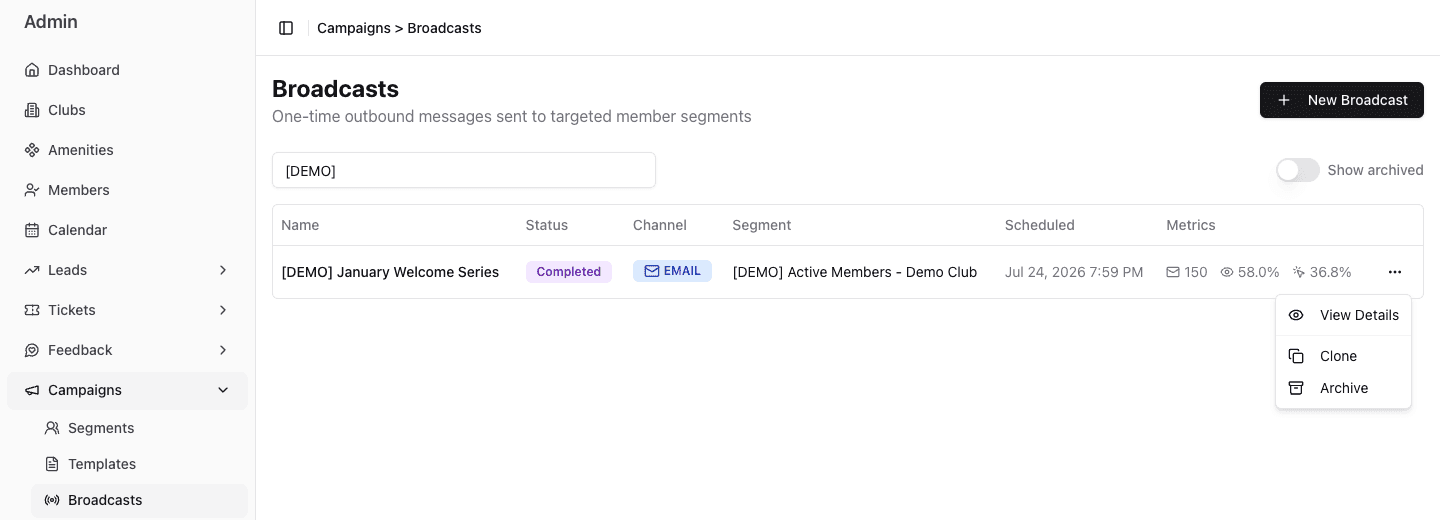
- 1Use View Details to inspect content and outcomes.
- 2Clone creates a new Draft for a separately reviewed send.
- 3Archive removes a terminal record from the default list without deleting it.
Draft actions
Use Edit to reopen the wizard. Review every step after changing the audience, channel, template, content, or timing.
Use Publish only after the fresh audience confirmation is reasonable.
Use Delete only for an unwanted draft. Deleting removes that draft instead of preserving it for reporting.
Live and scheduled actions
| Action | Available when | Operational result |
|---|---|---|
| Pause | Active or Sending | stops later work at the next safe send checkpoint; work already handed off can finish |
| Resume | Paused | releases waiting work; an interrupted main send can re-evaluate the remaining audience |
| Cancel | Active, Sending, Paused, or Scheduled | marks the campaign canceled; work already handed off can still finish |
Pause is not an emergency stop. FitStack checks the campaign status during sending and stops later work, but a batch or smaller send wave already handed off can finish. Pause or cancel cannot recall those messages. Check the status and results to understand what was sent.
Monitor a live send
Open View Details after publishing. While a broadcast is queued, sending, or paused, the live progress panel refreshes about every ten seconds and shows:
- whether the send is waiting, sending, or paused;
- the current batch position when it is available;
- Sent compared with Recipients, with a progress bar;
- Pause or Resume without returning to the list.
Treat the Sent count as advisory because FitStack reconciles it in the background. The status badge is the source of truth for whether the broadcast is still running or complete. If Pause interrupted the main send, Resume can start a new dispatch: batch numbering restarts over the remaining audience, and FitStack continues from recipients who have not been sent to rather than re-sending completed messages. If only quiet-hours cohorts were waiting, Resume releases those original cohorts without evaluating the Segment again.
Broadcast status controls sending, not AI handling of replies to SMS messages already delivered. If a published Broadcast captures interested replies into a Lead pipeline, Pause, Cancel, and Archive do not clear that destination or stop a later reply from creating a Lead there. See Manage pipelines safely before retiring a destination pipeline.
Completed, canceled, or failed actions
Use Clone to create a new Draft with the same core configuration. Scheduling and delivery metrics are reset. Review the audience, content, links, dates, and timing before publishing the clone.
Use Archive to remove a finished record from the default list. Turn on Show archived when you need to find it later.
Reuse safely
Cloning is useful for a repeated operating pattern, not for skipping review:
- rename the clone for the new purpose and date;
- confirm the Segment still represents the intended audience;
- update time-sensitive content and links;
- recheck Email unsubscribe content or SMS length;
- choose a new schedule;
- read the new publish-time count.
Recommended maintenance
- Keep Draft names distinct and purposeful.
- Delete abandoned test drafts that have no future use.
- Archive terminal broadcasts when the active list becomes noisy.
- Do not treat a previous successful send as proof that a clone is still safe.
- Review failed, skipped, and deferred outcomes before repeating the message.