Write and preview content
Choose the channel, then either start from a matching template or write custom content. A template is optional; selecting one copies its content into the broadcast for review.
Start with the outcome
Before writing, state the one action or understanding the recipient should leave with. Keep each broadcast focused on that outcome.
Complete both:
- Subject Line — specific, recognizable, and consistent with the body;
- Email Body — the message, relevant links, and required unsubscribe link.
Use the variable hints shown in FitStack. For example,
{{member.firstName}} can personalize a greeting. Preview variable-driven
content with realistic missing-data cases in mind; do not make the meaning
depend on a value that may be absent.
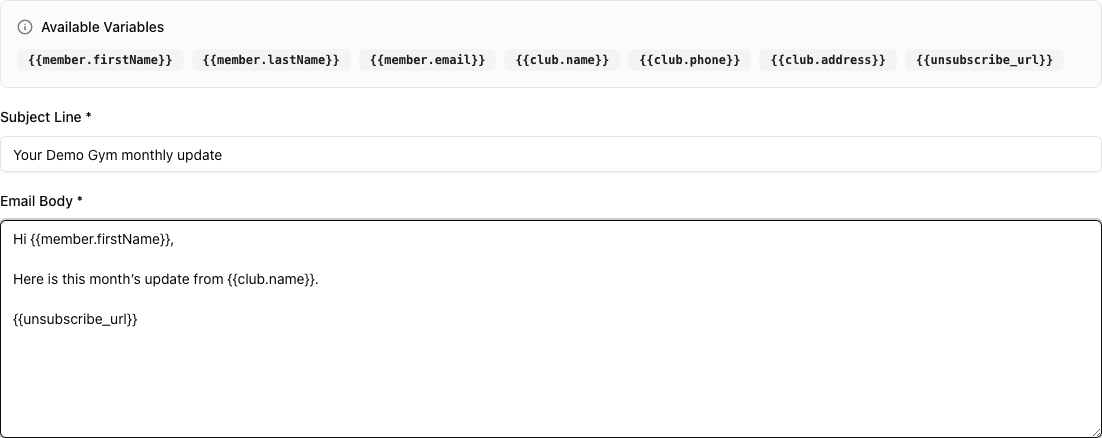
- 1Use only the variables offered for Email.
- 2Write a specific subject that matches the message.
- 3Review body content, personalization, links, and the unsubscribe URL together.
Email content must include {{unsubscribe_url}}. Send yourself a test
through your team’s approved review process and verify every destination
before publishing broadly.
SMS
Keep SMS concise and make the sender and requested action clear. As you type, FitStack estimates:
- character count;
- SMS segment count;
- encoding;
- estimated cost per message;
- estimated campaign total when the audience count is available.
Long messages and some symbols or emoji can use multiple SMS segments and increase cost. The estimate uses sample personalization values, so actual message length and cost can vary by recipient.
The SMS wizard may include an optional Keywords step. This learning path does not configure keywords or automated reply handling. A separate, reply-driven option can let the marketing assistant capture demonstrated interest into a selected Lead pipeline; see When an SMS reply becomes a Lead before enabling it.
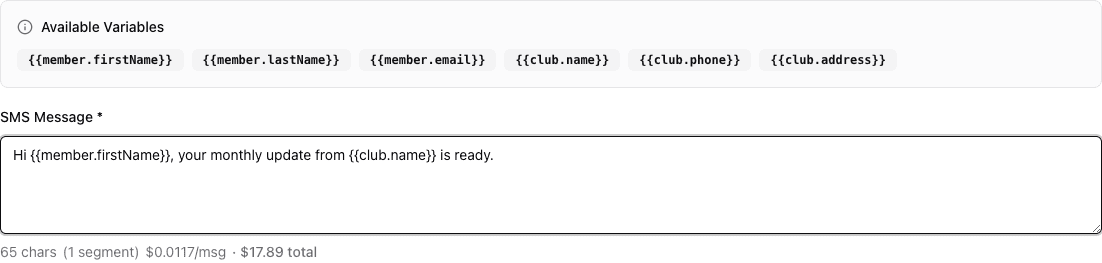
- 1Use only the variables offered for SMS.
- 2Keep the sender, message, and action clear in the body.
- 3Recheck character, segment, and cost estimates after every edit.
Personalization checklist
- Use only variables offered in the editor.
- Read the subject and body with sample values substituted.
- Avoid placing essential context in a variable.
- Confirm club name, phone, address, dates, and links.
- Recheck SMS length after adding personalization.
- Make the opt-out path clear and preserve required compliance content.
Final content review
Ask a reviewer who did not write the message to check:
- the intended audience and channel;
- the sender’s identity;
- the primary action;
- dates, prices, locations, and offer limits;
- every link;
- personalization and fallback wording;
- unsubscribe or opt-out requirements.
Then continue to Publish or schedule safely.