Publish or schedule safely
Publishing changes a draft into a live or scheduled broadcast. For an immediate send, this is the action that can start messaging recipients.
Choose when the send becomes eligible
| Choice | Result |
|---|---|
| Send immediately after publishing | the broadcast becomes active and starts preparing the send |
| Schedule for a specific time | the browser-local time becomes one absolute eligibility time for the entire broadcast |
The selected time is an eligibility threshold, not an exact start time.
FitStack checks scheduled broadcasts at :00, :15, :30, and :45 each
hour. A broadcast scheduled for 10:01 can therefore be picked up at 10:15 or
later. Audience evaluation, workflow processing, policy checks, provider
processing, and SMS delivery hours can add more time before delivery completes.
Send Date & Time uses the local time zone of the browser or device where the broadcast is scheduled. FitStack stores one absolute moment for the whole broadcast; it does not interpret that value separately in each club’s time zone. If you are scheduling for a club in another time zone, convert the intended club-local time before entering it.
SMS quiet hours and delivery restrictions
SMS follows each recipient’s club-local delivery window. A recipient outside that window is deferred, not immediately dropped.
For the cross-channel behavior, reply rules, and current exceptions, see Quiet hours and messaging.
The advanced delivery-hours control can narrow the window for this broadcast:
- set both a start and end time;
- interpret both times in each club’s local time;
- leave both blank to use the club default;
- use Clear restriction to remove a saved campaign-specific window.
One delivery-hour boundary is incomplete and is not enforced. A campaign window narrows allowed hours; it does not spread messages evenly across that range.
Pace a large send by batch
Open Advanced: batch pacing when you want to control how many recipients FitStack processes at a time and whether it waits before starting the next batch.
- Recipients per batch accepts
1–250and defaults to100. - Seconds between batches accepts
0–3,600and defaults to no delay. - Leave both fields blank, or select Use defaults, to restore
100per batch with no delay.
A deliberate delay creates an observation window: watch the live results and Pause before another batch begins if delivery or engagement looks wrong. It does not spread recipients evenly across the day and does not guarantee an instant stop. A batch or smaller send wave that FitStack already handed off can finish before the pause takes effect.
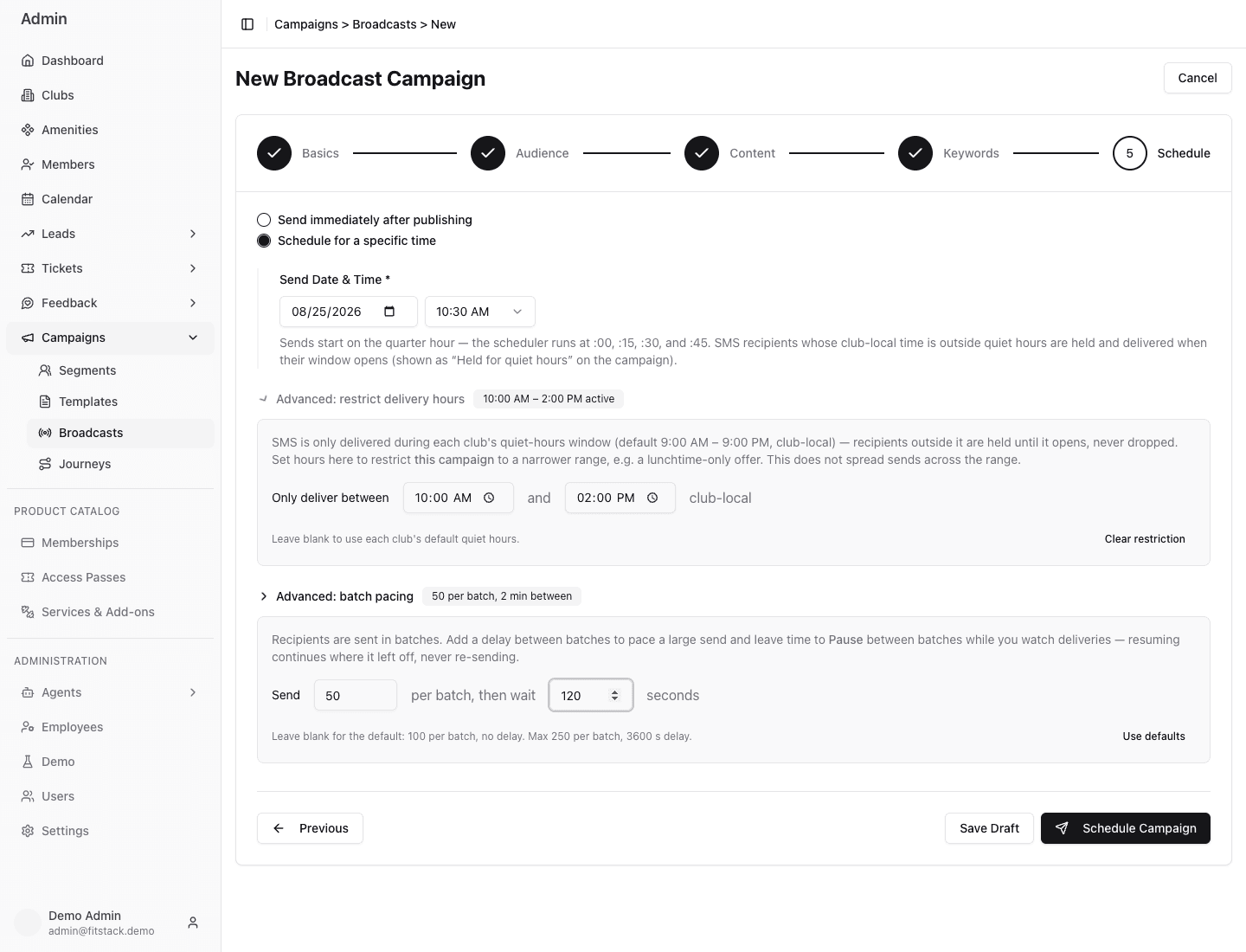
- 1Choose immediate processing or one browser-local eligibility time.
- 2Set both delivery-hour boundaries in each club’s local time.
- 3Choose the batch size and optional delay, or restore the defaults.
- 4Save a draft or continue to the fresh audience confirmation.
Use the publish confirmation as a stop point
Before FitStack publishes, it counts the audience and asks you to confirm.
Chooses a future browser-local eligibility time, narrows SMS delivery hours to 10:00 AM–2:00 PM club-local, sets batches of 50 with a 120-second delay, and opens the fresh audience-count confirmation. The confirmation is canceled; no broadcast is created or scheduled.
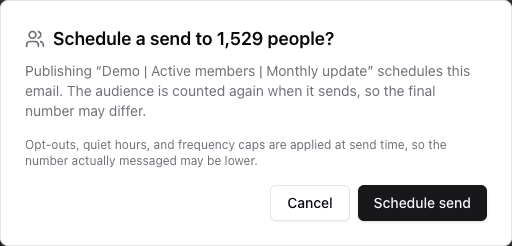
- 1Compare the fresh count with the expected audience.
- 2Account for consent, quiet hours, frequency limits, and a later scheduled recount.
- 3Cancel on any surprise; use the final action only after review.
Read the fresh count
Compare it with the Segment estimate and the number your team expected.
Confirm the channel and timing
The confirmation distinguishes an immediate send from a scheduled send and names the message type. For a scheduled send, confirm that the browser-local time represents the intended absolute moment.
Read the policy note
Opt-outs, quiet hours, and frequency limits are applied at send time. The count is therefore an upper bound on who will actually be messaged.
Stop on a warning
Do not publish past a zero audience, missing audience, unavailable count, or surprising total until the cause is understood.
Confirm deliberately
For an immediate send, the final button states how many people currently match. For a scheduled send, FitStack counts the audience again when the send starts.
Final preflight
- The name and description match the business purpose.
- Club scope is intentional.
- Consent aligns with Email or SMS.
- The fresh count is reasonable.
- Content, variables, links, dates, and required opt-out content are correct.
- The browser-local eligibility time, scheduler interval, and club-local SMS delivery window are understood.
- The batch size and delay are intentional; large sends have a monitoring and Pause plan.
- A second operator reviewed high-impact or large sends.
After publishing, use Manage broadcasts for status-dependent actions and Results and troubleshooting for delivery outcomes.