Broadcasts overview
A broadcast is a one-time email or SMS message sent to a targeted audience. Use it for a specific announcement, reminder, promotion, or update that should go out once.
A broadcast combines four decisions:
- Basics — a clear internal name and purpose.
- Audience — the people the message is intended for.
- Content — one supported channel and its message.
- Schedule — send after publishing or start at a future time.
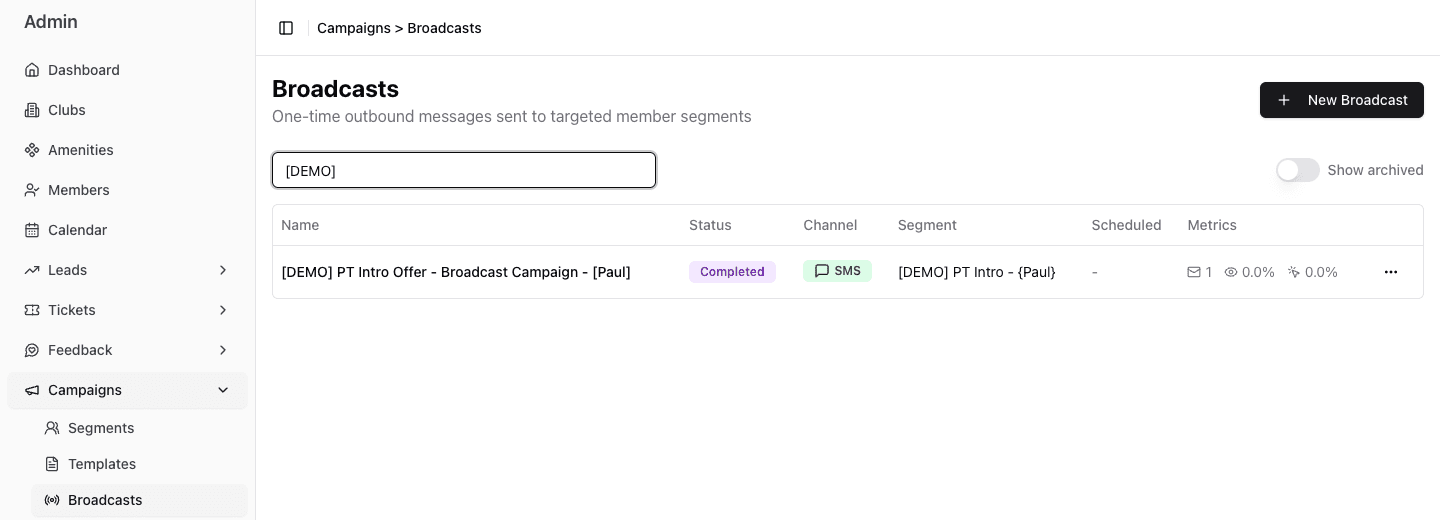
- 1Start a new one-time message.
- 2Search by broadcast name.
- 3Read status, channel, audience, schedule, and one-decimal results together.
Broadcasts and segments
A saved Segment defines who is relevant. The broadcast uses that segment, checks the current matches when the send starts, and then applies current contact, consent, timing, and communication-policy rules.
A segment’s estimated size is not a delivery promise. The publish confirmation shows a fresh match count, and the number actually messaged can be lower.
When to use a broadcast
Use a broadcast when:
- the message should be sent once;
- the audience can be expressed as a saved Segment or one-time set of rules;
- Email or SMS is the right channel;
- a staff member should choose when the send starts.
Do not use a broadcast for a multi-step sequence or behavior-triggered automation. Those workflows belong in Journeys. Return to Plan and run campaigns when the communication pattern is not yet clear.
When an SMS reply becomes a Lead
An SMS Broadcast can optionally let a marketing assistant handle replies that do not match the configured keywords. When the recipient expresses interest, the assistant can capture that opportunity into the pipeline and optional starting stage selected on the Broadcast.
This path is deliberate and reply-driven:
- turn on AI reply handling for the SMS Broadcast;
- choose the pipeline that should receive interested people;
- optionally choose the stage where captured Leads should begin;
- review the assistant guidance and downstream stage ownership;
- publish only after the reply and handoff behavior are understood.
If the person already has an open Lead in that pipeline, FitStack records the new campaign interest on the existing Lead instead of opening a duplicate.
A selected pipeline is required for an actionable Lead handoff. Without one, the assistant may acknowledge the interested reply and the conversation remains available in interactions, but FitStack does not create a Lead, assign it, notify staff, or create a follow-up task through this path. Staff would have to monitor and handle that conversation manually.
Sending, delivery, or a link click does not create a Lead through this path. The current Broadcast handoff requires an interested SMS reply and configured AI reply handling. Email Broadcasts do not use this reply-driven capture.
See Leads overview to compare this route with Journey opportunities, staff entry, GymSales synchronization, and supported prospect intake.
Before you begin
Confirm:
- the business purpose and the club or clubs in scope;
- a small, consented test Segment;
- the intended channel;
- the final content, links, and personalization;
- whether the message should start immediately or later.