Personalize, preview, and test
Personalization makes reusable content relevant, but it also adds values that can vary in length or be unavailable. Use only the variables FitStack offers for the selected channel.
Supported variables
| Group | Variable | Shown in | Example preview value |
|---|---|---|---|
| Member | {{member.firstName}} | Email, SMS | James |
| Member | {{member.lastName}} | Email, SMS | Bond |
| Member | {{member.email}} | Email, SMS | james.bond@example.com |
| Member | {{member.phone}} | (555) 007-0007 | |
| Club | {{club.name}} | Email, SMS | Downtown Fitness Club |
| Club | {{club.code}} | downtown-la | |
| Club | {{club.phone}} | Email, SMS | (555) 987-6543 |
| Club | {{club.address}} | Email, SMS | 123 Main Street, Corona, CA |
| Club | {{club.email}} | info@downtownfitness.com | |
| Helper | {{now}} | the current long-format date | |
{{unsubscribe_url}} | an unsubscribe preview link |
Use the full variable exactly as shown, including both pairs of braces.
{{unsubscribe_url}} is required for Email and is not an SMS variable.
Preview with sample data
The Email preview replaces variables with the displayed sample member and club. Use Split view while editing, then switch among the mobile, tablet, and desktop preview widths.
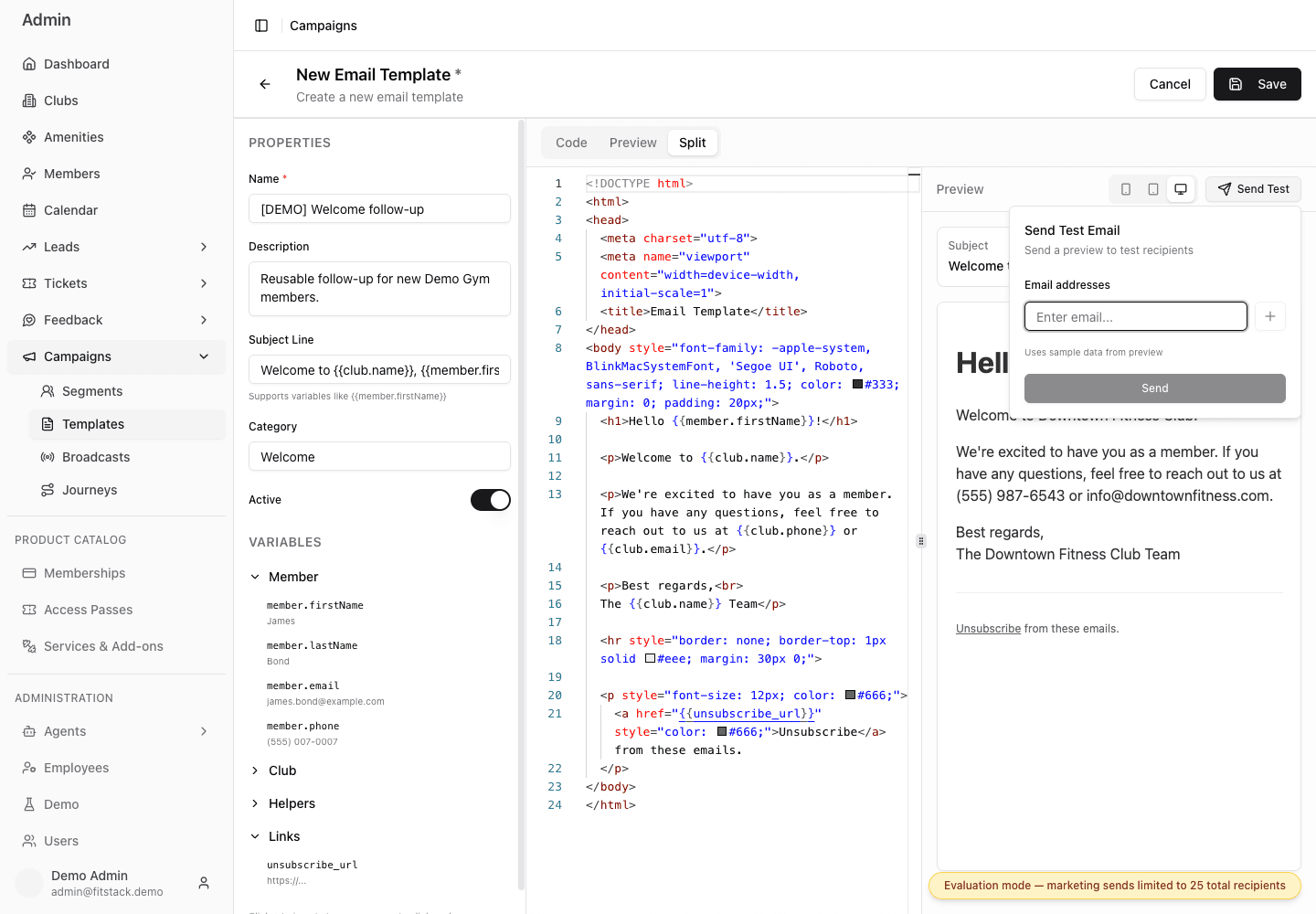
- 1Insert only variables offered in the editor.
- 2Compare mobile, tablet, and desktop widths.
- 3Open Send Test only when the rendered subject and body are ready.
- 4Remember that both preview and test use sample member and club data.
Send Test sends a real Email. Use only deliberate test recipients, verify every address, and follow your team’s approval process. The control accepts up to ten valid addresses.
Test the risky parts
For Email, verify:
- the subject and sender intent;
- mobile, tablet, and desktop layout;
- every link and destination;
- personalization in the subject and body;
- the unsubscribe link;
- dates, prices, locations, and offer limits.
For SMS, use the live sample substitution to check length and cost. Then verify the content again in a small, consented test Broadcast.
Design for variable values
- Keep essential context outside variables.
- Expect names and club details to be longer than the sample.
- Avoid wording that becomes confusing if a value needs correction.
- Recheck SMS segments after adding variables.
- Read the final Broadcast content after choosing the template.