Results and troubleshooting
Open a non-Draft broadcast and select View Details to see its audience, channel, timing, delivery metrics, engagement metrics, and message content.
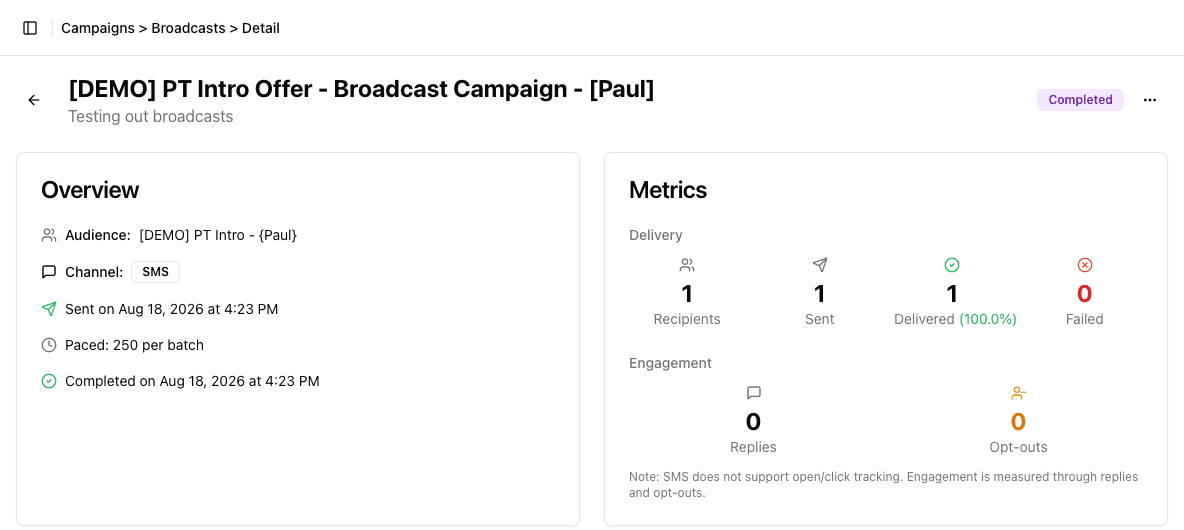
- 1Confirm the broadcast identity before reading results.
- 2Check the audience, channel, timing, and batch pacing used.
- 3Compare recipients, sends, deliveries, and failures before judging reach.
- 4Read SMS replies and opt-outs separately from delivery.
People matched when the broadcast started
Messages accepted for a provider send attempt
Messages reported as delivered
Consent, frequency, or active-conversation rules prevented a send.
An SMS waited for the club-local delivery window. Cumulative.
A send attempt could not be completed or delivered.
Delivery metrics
| Metric | Meaning | Kind |
|---|---|---|
| Recipients | people matched when the broadcast send evaluated its Segment | audience size |
| Sent | messages accepted for a provider send attempt | current state |
| Delivered | messages the provider reported as delivered | current state |
| Failed | attempts that failed before or after provider acceptance | current state |
| Skipped by policy | people excluded by current consent, frequency, or active-conversation rules | cumulative |
| Held for quiet hours | SMS recipients that encountered a closed club-local delivery window | cumulative |
These numbers answer different questions. Do not calculate success from Recipients alone.
During an active send, the live progress panel refreshes about every ten seconds and can show the current batch plus Sent compared with Recipients. Sent is advisory because it is reconciled in the background. Use the status badge, not the percentage alone, to decide whether the send is still running or complete.
Held for quiet hours and Skipped by policy are cumulative event counts, not live queues. They record what happened during a send; they never count down as those recipients are resolved. Sent, Delivered, and Failed are current state.
Engagement metrics
Email can show Opened, Clicked, and Unsubscribed outcomes when the provider reports them. The percentages beside Opened and Clicked are each a share of Delivered messages — the same figures on the broadcast list and the detail page — shown to one decimal place.
SMS shows opt-outs. Do not use the current Replies value as a decision metric until your team has confirmed that reply tracking is enabled and populated for the broadcast.
Delivery reporting can update after the broadcast first appears complete. Revisit the detail page after providers have returned their final outcomes.
Troubleshooting
The audience count is zero
- Open the attached Segment.
- confirm club scope and ALL/ANY;
- recalculate the Segment;
- confirm the intended consent field;
- check whether required member or lead data is missing.
Do not publish past the zero-count warning just to test the workflow.
Recipients is higher than Sent
Check Skipped by policy, Held for quiet hours, and Failed:
- no current channel consent;
- frequency limit reached;
- an active conversation or related workflow conflicts with the send;
- SMS outside allowed delivery hours;
- missing or invalid destination;
- provider rejection or processing failure.
Held for quiet hours is non-zero
The affected SMS recipients encountered a closed club-local window during send
evaluation. FitStack records each initial hold in this cumulative metric, but
does not subtract it when a held group later sends. The metric therefore
remains non-zero after a broadcast is Completed — a Completed broadcast showing
Recipients 1 / Sent 1 / Delivered 1 / Held for quiet hours 1 is one recipient
that was held, then sent, then delivered. Nothing is outstanding.
Use the campaign status — not this metric by itself — to determine whether delivery work may remain. While held groups are still waiting, the broadcast stays in Sending and remains cancelable. If you pause it before a held group’s window opens, it stays in Paused and the group waits with it, so Paused can also have delivery work outstanding. Either way the broadcast moves to Completed only once the last group has been released.
Held groups do not wait indefinitely through a pause. A broadcast left paused for more than seven days releases the groups still waiting on it without sending them. Resume within that window if the message still needs to go out.
There is one case where those recipients are picked back up: if the pause also interrupted the broadcast partway through sending, resuming re-evaluates the audience and contacts anyone who was never sent to, including members from a group that had already timed out. Treat that as a safety net, not a plan — resume in time instead.
Two consequences worth knowing:
- You cannot subtract to find who is still waiting. A recipient whose window was still closed when their group woke up is counted a second time under Skipped by policy rather than being held again. That recipient appears in both metrics.
- Resuming a broadcast that was paused mid-send can raise the number. If the pause interrupted the send before every batch had gone out, resuming re-evaluates the audience and counts anyone still inside quiet hours again — so the metric can exceed Recipients. Resuming a broadcast whose batches had all been sent does not re-count: it only wakes the groups already waiting.
A campaign-specific delivery window can narrow when held groups are eligible to send.
Skipped by policy is non-zero
Skipped recipients are not queued for later delivery by that decision. Review consent, recent marketing frequency, and active conversations before deciding whether a different follow-up is appropriate.
When an information icon appears beside Skipped by policy, hover over that metric to open the reason breakdown. FitStack can separate:
- no consent for the channel;
- a recent-message frequency cap;
- quiet hours that were still closed when a held send woke up;
- an active conversation on the same channel;
- an active Lead pipeline enrollment.
Older broadcasts may show only the total because the reason breakdown was not recorded for those sends.
Failed is non-zero
Confirm the channel configuration and inspect the campaign’s delivery outcome. If the failure affects many recipients, pause or cancel while the cause is investigated. FitStack checks status during sending, but messages already handed off can still finish. Do not immediately clone and resend a failed broadcast.
A scheduled broadcast has not started
Confirm:
- its status is Scheduled, not Draft or Paused;
- the selected date and time are correct;
- the scheduled time has passed and the next quarter-hour scheduler check has had time to run;
- the broadcast still has a valid audience and supported channel.
If the status remains unchanged after the next scheduler check and reasonable processing time, contact support with the broadcast name, status, channel, and scheduled time. Do not include member contact details in the support request.
Close the loop
Record what the results changed about the next message: audience definition, channel, timing, content, or offer. Archive the broadcast when it no longer needs to stay in the active list.